Troubleshooting Te whakatika raru
Find answers to common questions and troubleshooting problems with Emergency Mobile Alert.
On this page
Didn't get an alert
We expect most phones purchased after 2017 to receive Emergency Mobile Alerts.
Your phone needs to have cell reception and up-to-date software. You don’t have to download an app or subscribe to a service.
Other possible reasons for not receiving the alert may include your phone being:
- off
- in flight mode
- out of cellular coverage, or
- not connected to a targeted cell tower.
Emergency Mobile Alerts are an extra channel to help keep you safe in an emergency. There are many reasons you may not receive an Emergency Mobile Alert message. We encourage everyone to rely on lots of different ways to stay informed.
Received an alert multiple times
If your phone moves between a 4G and a 5G network during the time of the broadcast, you will have receive an alert from both networks.
The same thing happens if your phone connects to another cell tower at the time of the broadcast. For example, if you're travelling or are between two towers.
You will also receive multiple messages if you:
- turn flight mode on and off, or
- turn your phone off and back on.
Some phones have an optional alert reminder feature turned on. This can cause the phone to alarm repeatedly during the broadcast. If your phone has an alert reminder, you can find it in your phone settings. The settings might be called Wireless Alerts, Broadcast Alerts, or Emergency Alerts.
Alert message disappeared
If you received an Emergency Mobile Alert, you might still be able to find it on your phone.
For Android phones
Each Android phone is different. But emergency alerts are generally found in your 'Messages' app.
For example, in the 'Google Messages' app:
- Go to Messages app.
- Click your profile image in the top right.
- Select 'Messages Settings'.
- Select 'Advanced'.
- Select 'Wireless emergency alerts'.
For Apple phones
For iPhone users, the alert will be in your notifications. Access your notifications by swiping down from the top of your screen. If you delete your notifications, you will also delete the alert.
Govt.nz app
If you can't find your alert, you can also find it in the home screen of the Govt.nz app. To see alerts where you are, you need to set up your location preferences for the app first.
The government does not track you or your activity within the app. The app does not store your personal information.
You can download the app for free from Google Play or the Apple App Store.
Presidential Alert
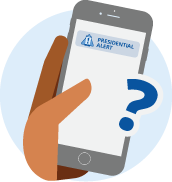
The Emergency Mobile Alert system uses an international standard. The broadcast channel we use is often called Presidential Alert overseas.
We have worked with phone manufacturers and mobile network operators to use the term Emergency Alert instead. But some phones will use the American standard and display Presidential Alert. This usually happens if:
- you bought your phone before 2017,
- you bought your phone overseas, or
- your phone was parallel imported.
Accessibility
The accessibility of Emergency Mobile Alerts depends on the make and model of your mobile phone. If you have a hearing aid, the alert can be set up to go through your hearing aid.

Alert sound
The sound used for Emergency Mobile Alert is based on an international standard. While it can be frightening or annoying, it was chosen to get your attention as it is unpleasant to the human ear.
Emergency Mobile Alerts, just like other alerts you receive, can be silenced by clicking the volume button on your device. If you press a volume button when an Emergency Mobile Alert comes in, the noise will be muted. The message will be left on the screen to read in full.
Whether your mobile phone makes a sound for an alert message depends on the make and model of your phone. Some phone manufacturers do not let emergency alerts override silent mode.

Driving when you receive an alert
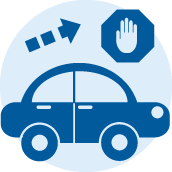
If you are driving, you should pull over and check the message as soon as it is safe to do so. If you have a passenger, ask them to read the alert immediately. Do not attempt to read the alert while driving.
Coverage of Emergency Mobile Alert
Emergency Mobile Alert should work in areas with cell reception. About 97% of populated areas get cell reception. Mobile service providers work to improve mobile coverage all the time.
Most phones and SIM-connected devices purchased in New Zealand after 2017 can receive Emergency Mobile Alerts. You might not get an alert if your device can’t receive cell broadcasts. For example, some parallel-imported devices.
Some examples of SIM-connected devices that can receive an Emergency Mobile Alert include phones, tablets, smart watches and even some EFTPOS machines!
Govt.nz app
If you have internet coverage but no cell reception, you can also find Emergency Mobile Alerts in the home screen of the Govt.nz app. You will need to open the app to read the alerts.
To see alerts where you are, you need to set up your location preferences for the app first.
The government does not track you or your activity within the app. The app does not store your personal information.
You can download the app for free from Google Play or the Apple App Store.
Wi-fi calling
Emergency Mobile Alert uses cell reception and is not broadcast using Wi-fi calling.
Landlines and satellite phones
Emergency Mobile Alert uses the New Zealand mobile networks. Alerts can only be broadcast to mobile phones capable of receiving them.
Starlink and satellite to mobile capability
You can only receive an Emergency Mobile Alert if you have mobile signal. Currently Starlink can only provide an internet connection, not a mobile signal. We understand Starlink are working on satellite to mobile capability. We are aware of another satellite provider (Lynk World) that is already providing this.
Cost of Emergency Mobile Alert
Receiving Emergency Mobile Alerts is free. There is no cost to you. You don’t have to download an app or subscribe to a service.
Opting out of Emergency Mobile Alerts
Emergency Mobile Alerts are broadcast to all cell towers in a targeted area that is at risk. For this reason, we cannot exclude your specific phone. Emergency Mobile Alerts do not use your mobile phone number or collect information about you.
Your phone may show optional settings used in other countries. But in New Zealand we will use a special broadcast channel that is always on.
If you do not want to get an Emergency Mobile Alert test, you need to turn your phone off or into flight mode.

Emergency Mobile Alerts
Emergency Mobile Alerts keep people safe. Alerts are broadcast to all capable phones from targeted cell towers.